Affiliate marketing relies heavily on unique URLs – the tracking links that connect a sale or lead back to you, the publisher. These links are essential for getting paid. However, they often look complicated, long, and filled with tracking codes that can make potential customers hesitant to click.
This clash between technical needs and user comfort has led many marketers to adopt affiliate link cloaking.
This guide explores the technical aspects, benefits, tools, and best practices of link cloaking, helping you decide if it’s the right strategy to optimize your affiliate marketing efforts without compromising compliance or user experience.
What Exactly is Affiliate Link Cloaking?
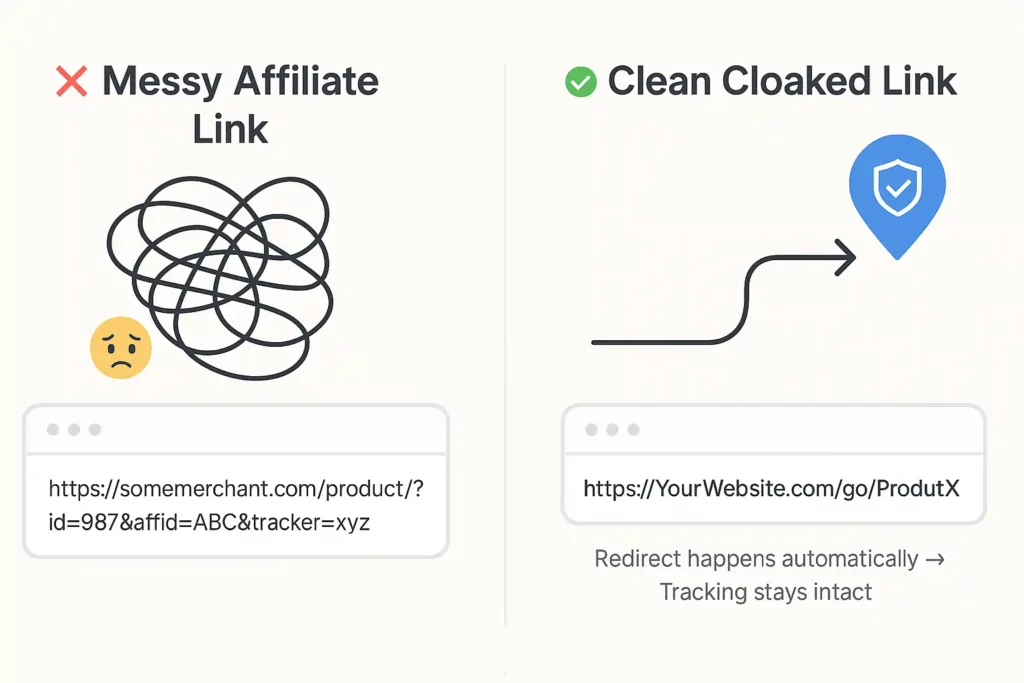
Affiliate link cloaking, sometimes called URL cloaking or cloaking, is the technique of hiding the original, often messy, affiliate link provided by a merchant or network.
Instead of showing that raw link like
https://somemerchant.com/product/?id=987&affid=ABC&tracker=xyzYou present a cleaner, shorter, and often branded link using your own website’s domain like
https://YourWebsite.com/go/ProductXThink of it like giving someone a simple custom map reference (YourWebsite.com/go/ProductX) instead of a complex library call number (MerchantSite.com/product/?id=123&affid=XYZ&tracking=abc) to find a specific item.
When a user clicks your cloaked link, a redirect happens behind the scenes.
This redirect quickly sends the user through the original affiliate link – making sure tracking works correctly – before they land on the merchant’s page. The user often doesn’t even notice the quick detour.
Example:
A typical raw affiliate link might look like this :
https://shareasale.com/r.cfm?b=895364&u=268480&m=5108&urllink=&afftrack=kinstablogUsing link cloaking, this could become :
https://YourWebsite.com/recommends/kinstaBoth links achieve the same goal, but the second one looks much cleaner and more trustworthy.
Link Cloaking vs. Link Shortening vs. SEO Cloaking
It’s important to understand the differences:
- Link Shortening: Primarily aims to reduce URL length, often using third-party domains (like bit.ly/xyz123). It lacks the branding and advanced management features of dedicated cloaking tools.
- Affiliate Link Cloaking: Focuses on creating branded, trustworthy links on your own domain using redirects. Goals include trust, branding, management, tracking, and commission protection.
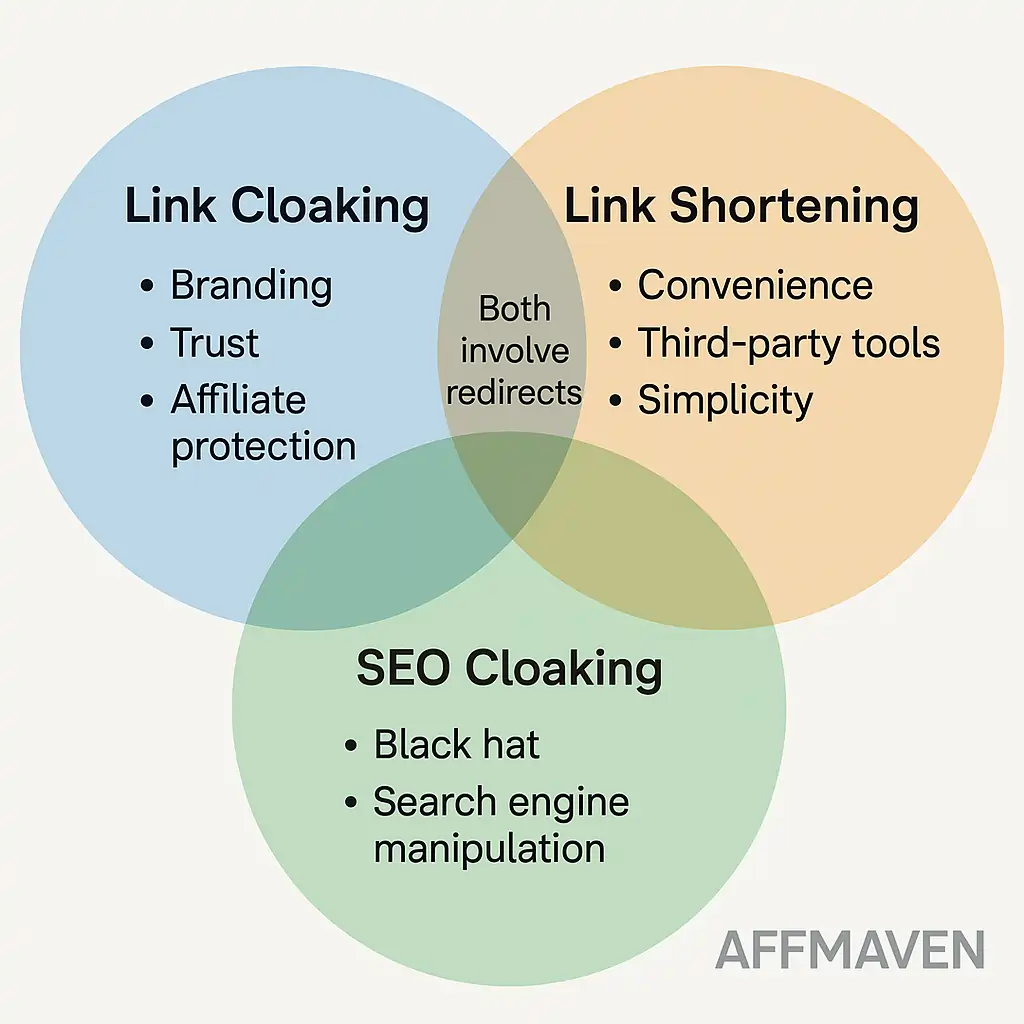
- SEO Cloaking (Black Hat): A deceptive practice showing different content to search engines versus users to manipulate rankings. This violates search engine rules and is completely different from the transparent redirection used in ethical link masking.
How Link Cloaking Works: A Technical Look
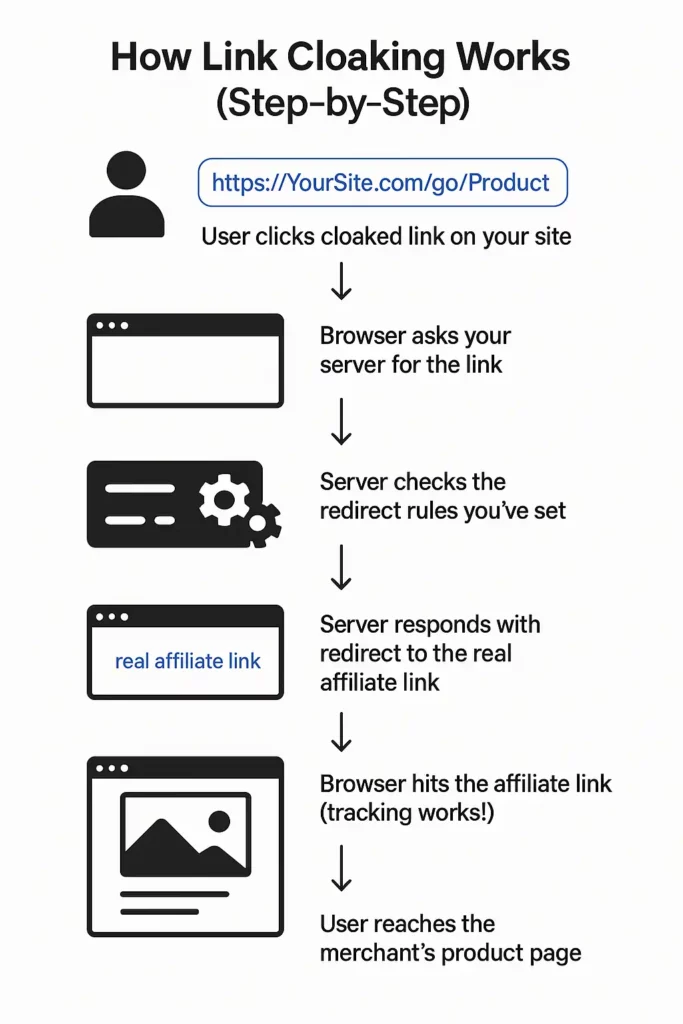
Link cloaking works using standard web technology called URL redirection. When someone clicks your cloaked link (https://YourSite.com/go/Product), their browser asks your server for that URL.
Your server, using rules you’ve set up, sees this request and sends back instructions (an HTTP status code and the real affiliate link) telling the browser to go to the actual affiliate URL instead.
The browser follows these instructions instantly, hitting the affiliate link (so tracking works) and then landing on the merchant’s page.
Understanding Redirect Types (301, 302, 307)
The specific instruction (HTTP status code) used for the redirect matters:
1. 301 (Moved Permanently):
Tells browsers and search engines the page has permanently moved. It passes most SEO value (“link equity”) to the new URL.
Generally not recommended for standard affiliate links because affiliate destinations can change, and passing SEO value to paid links goes against search engine guidelines. Use this for permanent site changes.
2. 302 (Found / Moved Temporarily):
Indicates a temporary move. Historically it didn’t pass SEO value reliably, though Google’s handling is more flexible now. Often used for cloaking , but 307 is usually preferred today for standard links. Still a valid option offered by many tools.
3. 307 (Temporary Redirect):
Also signals a temporary move, similar to 302. A key difference is it ensures the browser uses the same request method (like POST or GET) for the redirected request as the original. This is important for certain tracking scripts.
Because it’s temporary and preserves the request method without passing SEO value, 307 is widely considered the best choice for standard affiliate link cloaking. Many modern tools default to 307. Using the wrong redirect type (like a 301 for a potentially temporary affiliate offer) can send incorrect signals to search engines.
Implementation Methods: Plugins vs. Manual
There are two main ways to set up these redirects:
1. WordPress Plugins (Most Common & Easiest)
Tools like ThirstyAffiliates and Pretty Links are extremely popular for WordPress users.
- They provide a user-friendly interface inside your WordPress admin area to create, manage, categorize, and track your cloaked links.
- They handle the technical setup automatically, making it accessible even if you’re not a coder.
- These plugins often include extra features like click statistics, automatic keyword linking, and link health checks.
Quick Tutorial (using a plugin like Pretty Links):
- Install and activate the plugin.
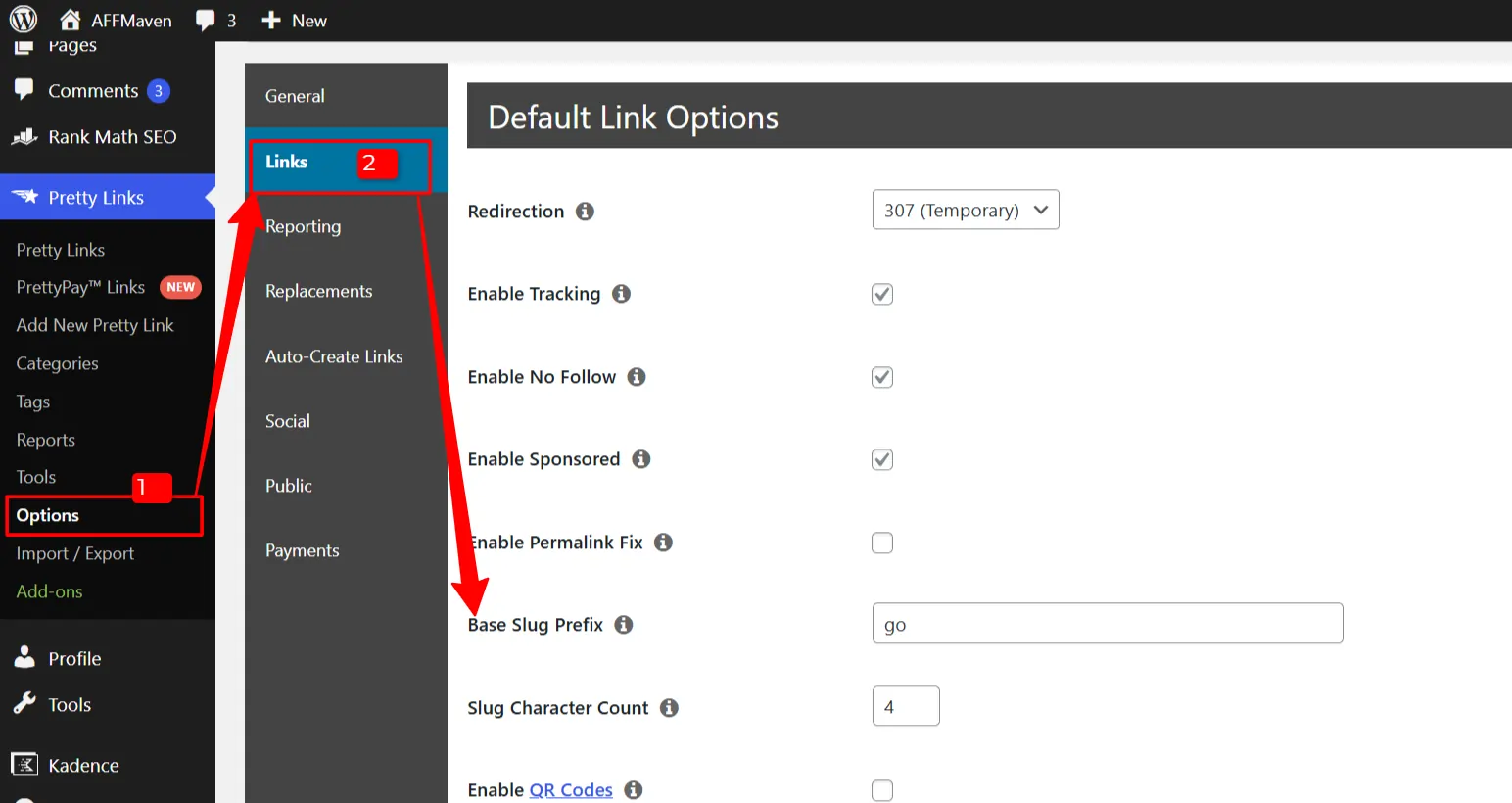
- Go to the plugin’s settings (e.g., Pretty Links > Options) and choose a “Base Slug Prefix” – this is the part that comes after your domain name (e.g., /recommends/, /go/, /visit/). Configure default settings like redirect type (choose 307) and whether to add rel=”nofollow” or rel=”sponsored”.
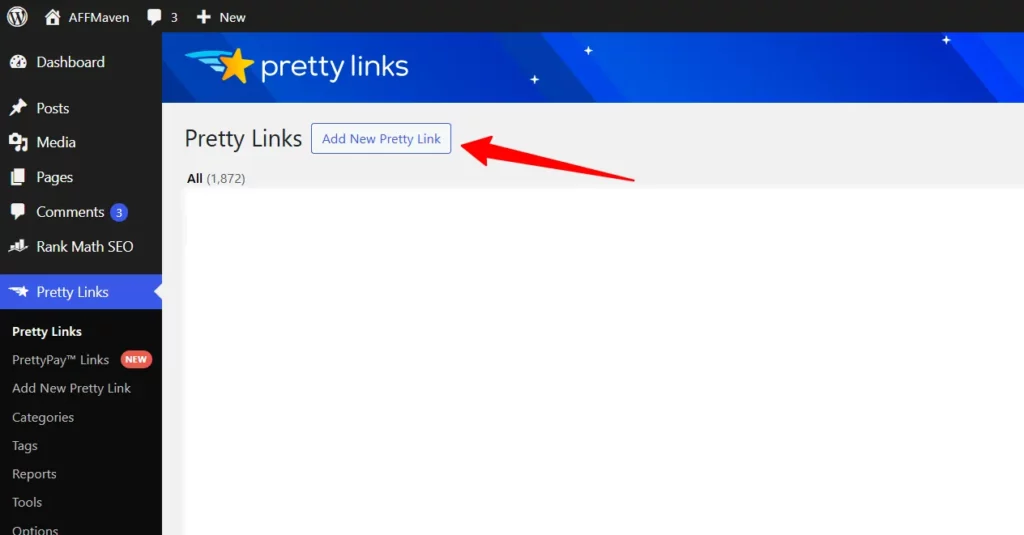
- Go to Pretty Links > Add New Pretty Link.
- Give your link a descriptive name (for your reference, e.g., “Kinsta Hosting Offer”).
- Paste the original, long affiliate URL into the “Destination URL” field.
- The plugin will automatically generate a “Cloaked URL” using your prefix and the link name (e.g., https://YourSite.com/go/kinsta-hosting-offer).
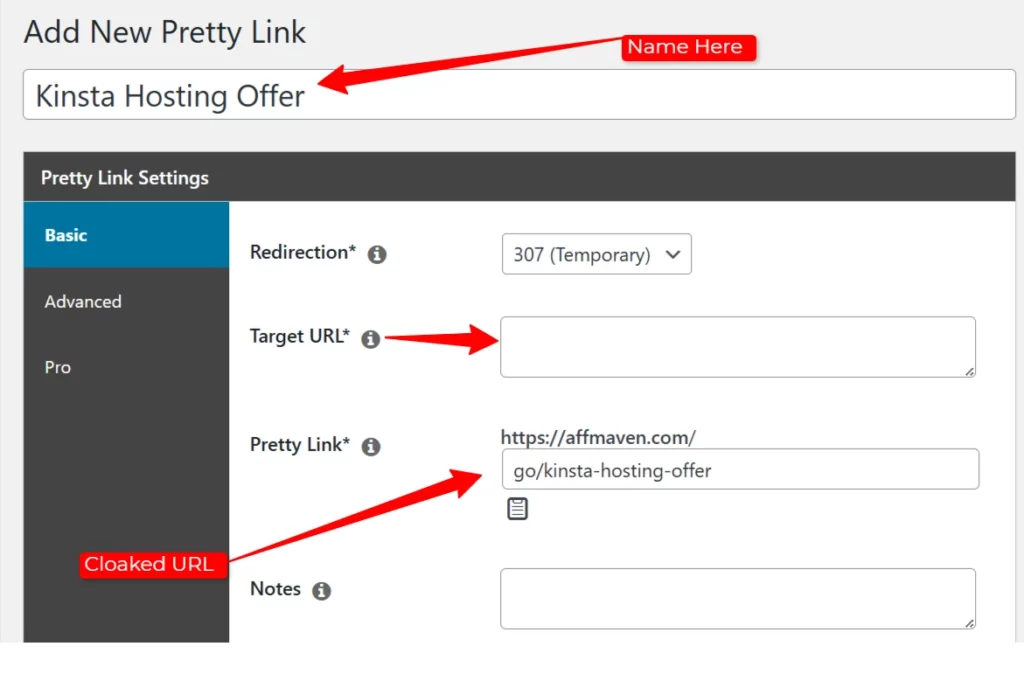
- You can usually edit the last part (the “slug”) if needed.
- Assign the link to a category if desired (e.g., “Hosting”) for organization.
- Save the link.
- Now, when writing posts, use the plugin’s button in the editor to easily insert your newly created cloaked link.
2. Manual Methods (More Technical)
- .htaccess (Apache Servers): Involves editing the .htaccess file directly using Redirect or RewriteRule commands. Requires server access and precise coding.
- PHP Scripts: Create a script (often in a dedicated folder like /go/) that reads a list of your links (e.g., from a redirects.txt file) and performs the redirect using PHP code. Offers flexibility but needs programming skills.
- These methods lack the easy management dashboards and extra features of plugins.
For most affiliate marketers, especially on WordPress, using a dedicated plugin is the most practical and efficient approach.
The Upsides: Why Cloak Affiliate Links?
Marketers choose to cloak links for several good reasons:
The Downsides: Potential Problems and Ethical Points
Using link cloaking isn’t risk-free. You need to be aware of potential issues:
Picking Your Link Cloaking Tools
For most WordPress users, plugins are the way to go. Here’s a look at two popular choices:
1. Pretty Links

2. ThirstyAffiliates
Comparison Snapshot
| Feature Area | Pretty Links (Pro) | ThirstyAffiliates (Pro) |
|---|---|---|
| Main Goal | Link Branding & Management | Affiliate Link Optimization |
| Ease of Use | Generally High | Good, maybe slightly more complex |
| Redirect Types | More options (301, 307, etc.) | Focused (301, 302, 307, JS) |
| Keyword Auto-Link | Yes | Yes |
| Geo-Redirects | Yes | Yes |
| Amazon Compliance | Limited | Strong (API Import, Uncloak) |
| Link Health Check | Yes | Yes (Automatic 404) |
| Product Displays | Yes (Add-on) | Yes (Add-on) |
| Reporting | Good | Good (includes Geo) |
| Price/Yr | $99 – $200 | $99 – $200 |
Note: Features and pricing are subject to change. Always check the official plugin websites for current details.
Other tools like Lasso offer more advanced features like conversion-optimized product displays and integrated revenue tracking but come at a higher price point, often suited for established, revenue-focused sites. Simpler plugins like Easy Affiliate Links also exist for basic needs.
Best Practices for Using Link Cloaking Well
To use link cloaking effectively and safely, follow these guidelines:
- Be Transparent (Disclosure): Always clearly disclose your affiliate relationships near the links. Use clear language like “This post contains affiliate links.” This is legally required (FTC) and builds trust.
- Follow the Rules (Compliance): Check and obey the ToS for every affiliate program. Don’t cloak if forbidden (like standard Amazon links). Always use rel=”sponsored” or rel=”nofollow” on your affiliate links for search engine compliance.
- Use Correct Tech Setup:
- Use 307 Temporary Redirects for most affiliate links.
- Ensure rel=”sponsored” or nofollow is applied to the link tag.
- Consider blocking your redirect folder (e.g., /go/) in robots.txt to save crawler resources (Disallow: /go/). This doesn’t replace the need for the rel attribute.
- Use reliable, updated plugins or tools.
- Focus on User Experience:
- Use descriptive slugs in your masked links (e.g., /go/best-running-shoes not /go/link5).
- Make sure the destination page is relevant to the link clicked. Don’t mislead users.
- Ensure redirects are fast.
- Monitor and Maintain:
- Regularly check for broken links. Use plugin features if available.
- Verify tracking data periodically.
- Stay updated on platform rules and guidelines.
Final Thoughts: Is Link Cloaking Right for You?
Affiliate link cloaking offers real benefits, especially for managing links efficiently and making them look more trustworthy. The ability to update a link’s destination in one place is a massive time-saver for active affiliates.
However, the risks are also real, particularly concerning compliance with affiliate program rules (like Amazon’s) and search engine guidelines (using rel=”sponsored”/nofollow). Transparency with your audience through clear disclosure is non-negotiable.
Ultimately, the decision depends on your specific situation. If you manage many links, value brand consistency, and are committed to following the rules carefully, link cloaking can be a smart addition to your affiliate toolkit. Just ensure you prioritize transparency, compliance, and a good user experience above all else.
🚀 Get Exclusive Affiliate Marketing Secrets🚀
Discover the strategies, tools, and tactics used by the top 1% of affiliate earners!

Join 69,572+ Affiliates already leveling up their game
Affiliate Disclosure: This post may contain some affiliate links, which means we may receive a commission if you purchase something that we recommend at no additional cost for you (none whatsoever!)