
An anti-detect browser is a must-have tool for any affiliate marketing specialist, advertising expert, crypto enthusiast, or web scrapper. Ad networks and other online platforms collect vast amounts of data about users to identify them and prevent multi-accounting.
This data includes IP addresses, hardware configuration, installed browser extensions, fonts, languages, and more. If you want to protect your ad accounts from bans and maximize your online earnings, you need an anti-detect browser.
The software spoofs digital fingerprints, preventing websites from tracking your accounts down and blocking them.
How Do Platforms Detect Multi-Accounting?
- One method platforms use to detect multi-accounting is tracking IP addresses. If a website detects an IP address that appears suspicious, it may block or prevent the creation of accounts from that address. Proxies or VPNs may help you bypass it, but they may not be enough for platforms like Google or Facebook.
- User behavior. If someone uses the platform unusually or suspiciously, they might receive a warning, a CAPTCHA, or an outright ban. For example, Facebook considers publishing numerous ads consecutively as suspicious behavior, associating it with fraudsters who hack into accounts.
- Digital fingerprints. Websites analyze parameters of users’ devices, known as digital fingerprints.
In a nutshell, anti-detect browsers provide their users with spoofed fingerprints, presenting platforms with different parameters instead of the actual information about the users’ devices. In this article, I’ll explore how anti-detect browsers work, using Octo Browser as an example.
How Can Octo Browser Help You Bypass User Identification?
Blending with the crowd ensures users don’t raise red flags with anti-fraud systems. It’s essential to blend in seamlessly. Like many other anti-detect browsers, Octo Browser operates on Chromium, which is the backbone of many popular browsers, including Google Chrome.
To ensure high security and anonymity, Octo Browser spoofs fingerprints at the browser kernel level and removes Google’s tracking mechanisms like synchronization and cloud-based password management. Simply put, an anti-detect browser is a version of Chromium that ditches Chrome’s tracking while maintaining a similar look and feel for websites.
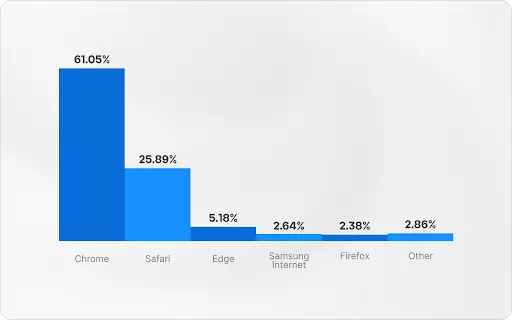
Browsers market share in 2023 according to SimilarWeb data
Developers regularly update Octo Browser to ensure its profiles don’t stand out among regular users after each Chrome update. In Octo, this process occurs within just a few days of each Chrome update.

Octo Browser Coupon Code
exclusive
- Antidetect browser for multi-accounting.
- Manage any number of accounts without hassle, IP bans and extra expenses.
- Create a quick profile in one click and start working immediately.
Save 30%
Octo Browser Top Features
Advanced Fingerprinting
Octo Browser lets users configure 50 parameters of your profile, ensuring a high level of anonymity and security. There are several groups of parameters you can customize in Octo:
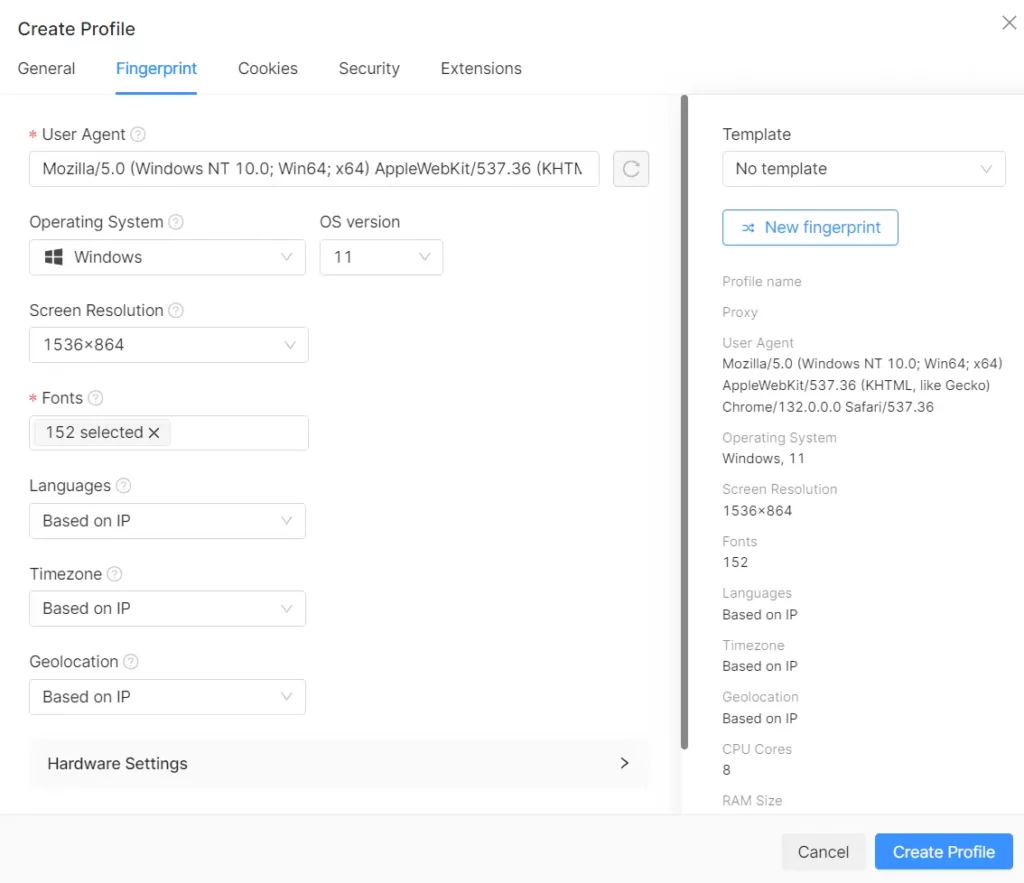
Users can create profiles manually or by using the “Quick Profile” feature. In most cases, a quick profile will be just enough to bypass any platform limitations or pass a Pixelscan check. Customizing every single parameter without a proper knowledge of what you’re doing may raise flags from security systems.
Tools for multi-accounting
An anti-detect browser should be able to manage multiple accounts conveniently in addition to fingerprint spoofing. Octo developers have added all the necessary anti-detection functionality to a cleaned version of Chrome, like a tagging system for teamwork, the Cookie Robot, video stream spoofing capability, simulating manual input, and more.
Moreover, the browser is optimized to run multiple profiles and includes automation tools that are available via API.
Another critical feature is managing proxies and connecting them to each profile. Remember to use high-quality proxies; if your proxies are in the database of unreliable proxies, no anti-detect browser will protect you from bans.
Recently, Octo Browser released its brand new feature, Proxy Shop, where users can purchase proxies from reliable providers.

In the Starter subscription, Octo increased the limit for saved proxies to 10. Now the general rule for all subscriptions in the Proxy Manager is that the number of connectable proxies equals the number of available profiles.

Regarding data security, Octo Browser is one of the best solutions. The browser stores all sensitive user profile data on European cloud servers and uses advanced AES-256 encryption, adding an extra layer of security. Even if a data breach happens, accessing user profiles remains impossible due to multiple layers of encryption:
- A secret encryption key
- A unique database key
- The user’s key for password-protected profiles
In addition to top-notch encryption, Octo Browser offers two-factor authentication (2FA) for extra data protection. The feature significantly reduces the chances of unauthorized access, even if a password is compromised.
Activating 2FA is straightforward—navigate to your account settings, follow the setup instructions, and ensure you save backup codes for account recovery when needed. With these measures in place, Octo Browser provides a secure environment where you can confidently manage your accounts.
User Experience
User experience is also an essential aspect of a top-notch anti-detect browser. Since the Octo 2.0 update, developers have rolled out several UI enhancements that have made multi-accounting faster and more intuitive.
Users can create up to 100 profiles simultaneously, either as quick profiles or by importing them from cookie files. They can source profile data from templates, imports, random generation, or manual editing. Once profiles are prepared and configured, click the “Create Profiles” button to add them to your list.
Starting from Octo 2.1, developers introduced the “Tasks” feature. Tasks remind users or other team members what and when to do with a profile. For example, accounts go through several stages in affiliate marketing.
After creating the account, it must be “prepped” by visiting popular websites, then used to register an ad account, and left alone for a while. You can set a task to remember when to return to these activities.

Octo offers one of the most intuitive profile creation and editing interfaces among all anti-detect browsers. Users can manage their profiles from the Profile List, with pop-up windows appearing over it instead of navigating to separate pages.
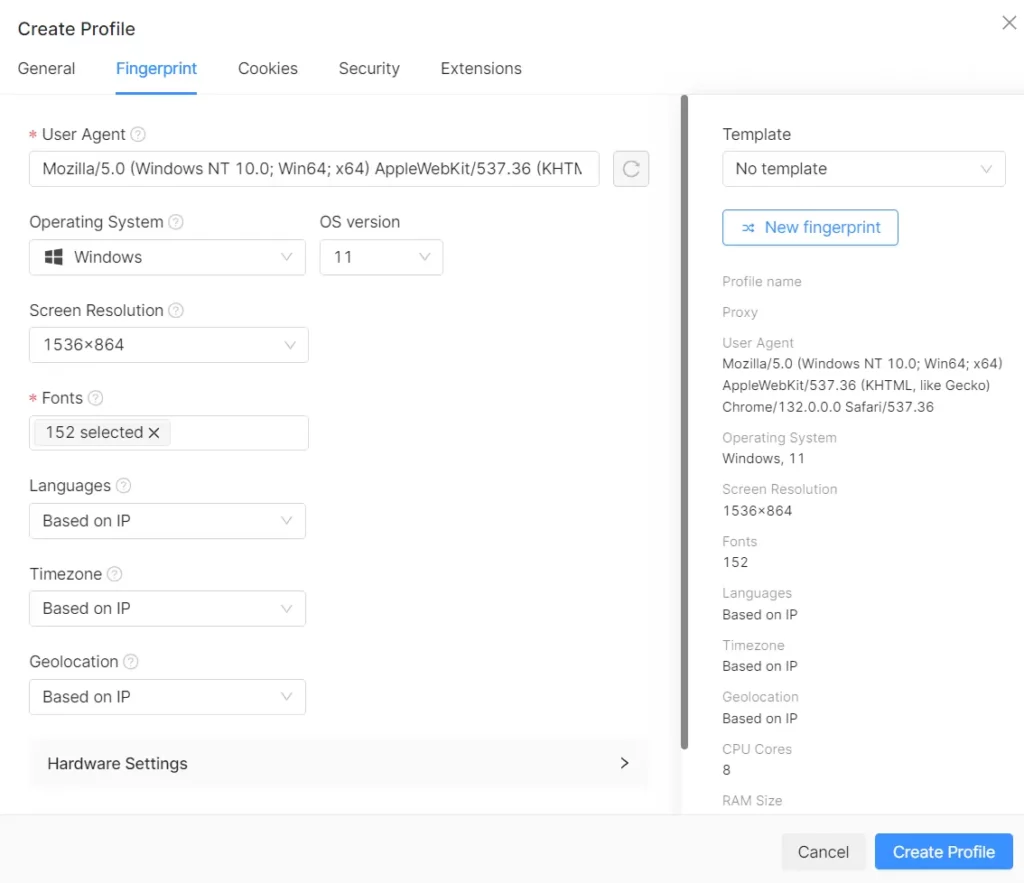
The Settings structure is compact, intuitive, and convenient. All profile parameters are easily accessible without having to switch screens. Additionally, you can see detailed fingerprint information on the right panel and template selection settings when creating or editing a profile.

Creating profiles in Octo Browser
Octo Browser Pricing

Octo Browser combines high-quality features with competitive and cost-effective pricing. Its plans are particularly suitable for users who need to manage multiple browser profiles or use automation tools. Long-term subscriptions come with significant discounts, allowing professionals to save money while enjoying a reliable, versatile, anti-detect browser designed to meet their needs.
How to Use Octo Browser?
Here’s a step-by-step guide to managing multiple accounts using Octo Browser:
1. Setting Up Your Octo Browser Account
To get started, create an Octo account by providing an email address and setting up a password. Verify your email, then download the Octo Browser installer for your operating system.
2. Installing the Browser
Octo Browser supports Windows, macOS, and Linux (Beta). Choose the version that suits your system, download it, and follow the on-screen instructions to complete the installation.
3. Creating and Customizing Profiles
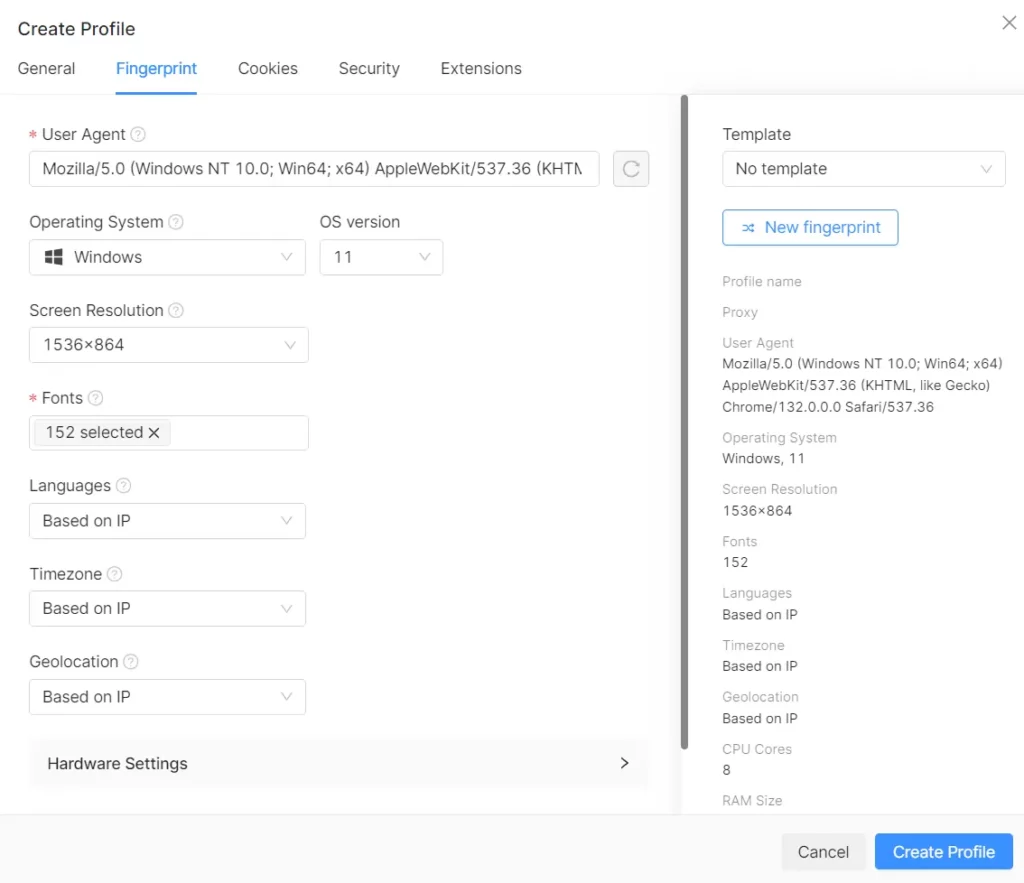
Once installed, you can create profiles using the “Quick Profile” or “Create Profile” options. Each profile comes with a unique digital fingerprint, ensuring anonymity and avoiding detection.
Profiles in Octo Browser are highly customizable and include settings grouped into several categories:
4. Setting Up Proxies and Managing Cookies
To maximize anonymity, assign a unique proxy to each profile. Navigate to the “Profiles” tab, select the proxy field, and configure a new proxy. If you don’t already have one, you can purchase proxies directly through Octo Browser. Save your proxy settings.
5. Running Profiles
After setting up, launch your profile, which will open a dedicated browser window. You can repeat this process to create and manage as many accounts as needed.
Octo Browser Coupon Code
exclusive
- Antidetect browser for multi-accounting.
- Manage any number of accounts without hassle, IP bans and extra expenses.
- Create a quick profile in one click and start working immediately.
Save 30%

Bottom Line
Octo Browser is a fast, secure, and user-friendly tool for managing multiple accounts. It’s designed for smooth performance and offers regular updates to ensure reliability. Features like API integration and headless mode make automation easy, saving time and effort for users.
With its affordability and advanced capabilities, Octo Browser is an excellent choice for individuals and teams looking for a powerful anti-detect browser.
🚀 Get Exclusive Affiliate Marketing Secrets🚀
Discover the strategies, tools, and tactics used by the top 1% of affiliate earners!

Join 69,572+ Affiliates already leveling up their game
Affiliate Disclosure: This post may contain some affiliate links, which means we may receive a commission if you purchase something that we recommend at no additional cost for you (none whatsoever!)