
Scribe is a process documentation software that’s changing how we create guides and tutorials. As someone who’s used it, I can say it’s a real time-saver. This screen recording tool captures your actions and turns them into detailed step-by-step instructions, complete with screenshots.
What sets Scribe apart is its AI-powered annotation system. It automatically adds notes to your captures, making your guides clear and easy to follow. The smart redaction feature is a lifesaver, blurring out sensitive info without you having to think about it.
I’ve found Scribe particularly useful for creating standard operating procedures and onboarding materials. It integrates well with other tools, and you can easily share your guides through embeddable links or PDF exports.
Let your documentation do all the work for you ✒
In this review, we’ll dig into Scribe’s features, including its workflow automation capabilities, custom branding options, and how it stacks up against other documentation tools in the market.
My Personal Experience With Scribe💯
My experience with Scribe has been quite positive. As a content creator, I’ve found its process capture feature incredibly useful. I simply hit record, go through my workflow, and Scribe does the rest. The auto-generated guides are surprisingly accurate, needing only minor tweaks.
What I appreciate most is the integration options. Scribe plays well with tools like Notion and Confluence, making it easy to share guides across my team. The chrome extension is a nice touch, allowing for quick captures without switching apps.
I’ve noticed a reduction in the time I spend on documentation tasks. What used to take hours now takes minutes. The version control feature has also been a lifesaver, letting me track changes and revert if needed.
Although Scribe isn’t flawless and sometimes skips a step or two, its AI editing tools make fixing mistakes very easy. Overall, it has become a crucial part of my work efficiency tools.
How Scribe Works🤔
Okay, so you’re probably wondering, “How does this Scribe thing actually work?” Let me break it down for you in simple steps:
Here’s a fun fact: Scribe claims it can help create guides 15 times faster than doing it manually. I was doubtful at first, but check out this comparison:
📊 Time to create a 10-step guide:
- Manual way: About 60 minutes
- Using Scribe: About 4 minutes
That’s a huge difference! 😮
Keep in mind, practice makes perfect. The more you use Scribe, the better you’ll get at creating awesome process documents in no time.
Key Features at a Glance🗝️
Let me walk you through some of the coolest things Scribe can do:
| Feature | What it does |
|---|---|
| Auto-capture any process | • Records your screen actions automatically • Works on web browsers and desktop apps • Saves time compared to manual documentation |
| Customize your process guide in seconds | • Edit text and screenshots easily • Add extra steps or notes • Use AI to generate titles and descriptions |
| Easily redact sensitive information | • Blur out private data in screenshots • Keep your guides compliant and secure • Protect customer and employee information |
| Share your guides with anyone, anywhere | • Send via link, email, or embed in other tools • Export as PDF or HTML • Works with tools like Sharepoint and Notion |
| See who views and completes your guides | • Track guide usage • Understand which processes need more explanation • Improve your team’s efficiency |
| Explain long processes with Pages | • Combine multiple guides into one document • Add text and video explanations • Create comprehensive training materials |
| Answer team questions and avoid interruptions | • Create a knowledge base of common processes • Let team members find answers on their own • Focus on important tasks without constant questions |
By using these features, I’ve noticed my team asking fewer repeat questions and getting up to speed faster on new processes. It has really improved how we work together.
Scribe for Different Teams👨💼
I’ve seen Scribe work wonders for different teams in our company. Let me break it down for you:
- Operations Team: These folks love Scribe for documenting processes. It’s helped them standardize how we do things, which means fewer mistakes and happier bosses.
- Customer Support: Our support team uses Scribe to make how-to guides for customers. It cut down on repeat questions and made everyone’s life easier.
- HR & Training: New hire onboarding is so much smoother now. HR creates guides for everything from setting up email to using the coffee machine!
- IT Department: When we get new software, IT uses Scribe to show us how to use it. No more confusing emails or long meetings.
Here’s a quick chart showing how much time each team saves per week using Scribe:
| Team | Hours Saved |
|---|---|
| Operations | 5 |
| Customer Support | 8 |
| HR & Training | 6 |
| IT | 7 |
One cool thing is how Scribe helps with knowledge sharing across teams. For example, when our marketing team figured out a great way to use our new analytics tool, they made a Scribe guide and shared it with everyone. Now we’re all data experts!
Don’t forget that, Scribe works best for computer-based tasks. For stuff like how to operate the new coffee machine, you might need to add some extra notes or pictures.
Scribe’s Ease of Use and Time Savings⌛
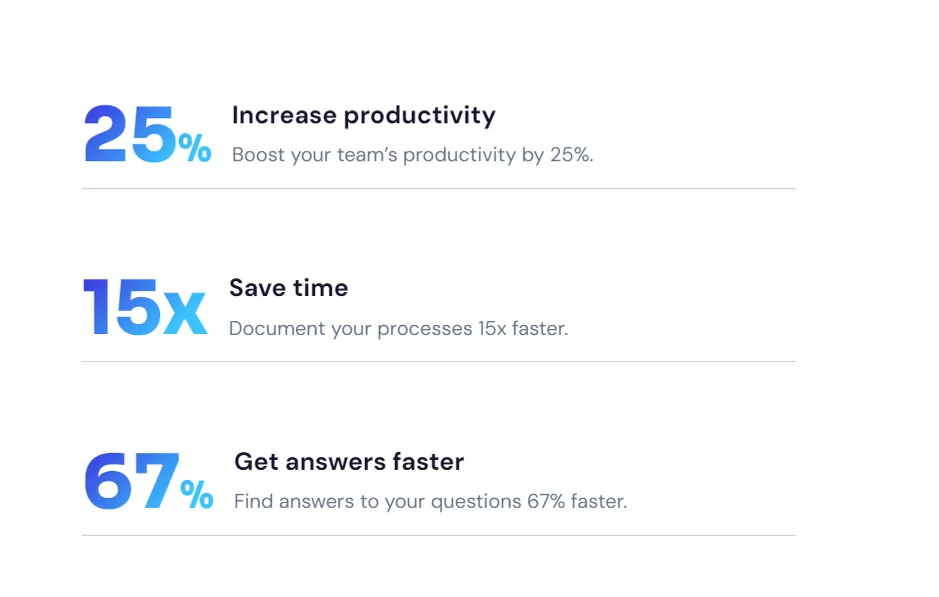
I’ve been using Scribe for a while now, and I’m amazed at how much time it saves me. Here’s what I’ve noticed:
Here’s a quick breakdown of how Scribe has changed my workday:
| Task | Before Scribe | With Scribe |
|---|---|---|
| Making a guide | 60 minutes | 4 minutes |
| Answering questions | 10 per day | 3 per day |
| Training new hires | 2 days | 1 day |
One thing I love is how Scribe helps with process improvement. When we see our tasks laid out step-by-step, it’s easier to spot ways to make them better.
If you’re buried under a mountain of documentation or tired of answering the same questions over and over, give Scribe a try. It might just change your work life like it did mine.
Scribe Integrations With Other Platforms🔄️
Scribe shines when it comes to playing nice with other tools. Let’s look at how it works with some popular workplace apps:
#1 Notion Integration
Scribe and Notion make a great team. You can easily embed your Scribe guides right into your Notion pages. This means your step-by-step instructions live where your team already works. No more jumping between apps!
🔗 How it works:
Now your team can see the guide without leaving Notion. It’s that simple!
#2 Confluence Integration
For Atlassian Confluence users, Scribe fits right in. You can add your process documentation to your Confluence pages, keeping all your team’s knowledge in one spot.
📊 Quick stats: Teams using Scribe with Confluence report:
#3 SharePoint Integration
If your team uses Microsoft SharePoint, Scribe’s got you covered. You can embed guides in your SharePoint sites, making it easy for everyone to access the latest procedures.
Use Scribe to document your SharePoint processes. It’s a great way to help new team members navigate your intranet!
By integrating Scribe with these tools, you’re making sure your knowledge base is always up-to-date and easy to find. It’s all about working smarter, not harder!
Scribe Pricing Plans💵

When it comes to process documentation tools, Scribe offers a range of plans to suit different needs and budgets. Let’s break down the options:
A. Scribe Pricing Overview
Here’s a quick look at Scribe’s pricing tiers:
| Plan | Plan | Key Features |
|---|---|---|
| Basic Plan | Free | Web app support, Quick customization, Shareable links |
| Pro Personal Plan | $29/month | Desktop & mobile support, Branding, Screenshot editing |
| Pro Team Plan | $15/seat/month | Team collaboration, PDF/HTML export |
| Enterprise Plan | Custom | Advanced security, SSO, Central management |
B. Value for Money
To understand the real value of Scribe, let’s do a quick calculation:
Imagine you create 10 process guides per month. Without Scribe, each guide might take 2 hours. With Scribe, it could take just 15 minutes.
Time saved per month = (2 hours – 0.25 hours) × 10 guides = 17.5 hours
If your time is worth $50/hour, that’s a saving of $875 per month!
Start with the free plan to test Scribe’s features. As your documentation needs grow, upgrade to a plan that fits your workflow.
C. Scribe Free Trial and Discounts
Scribe offers a 14-day free trial of their Pro plans. This gives you a chance to explore advanced features like:
Keep an eye out for seasonal discounts or special offers for non-profits and educational institutions.
The right plan depends on your specific needs. If you’re a solo consultant or part of a large enterprise, Scribe has options to streamline your process documentation and boost productivity.
Scribe Chrome Extension
The Scribe Chrome extension is a handy tool for creating step-by-step guides right in your browser. It’s perfect for making quick tutorials or documenting processes without switching between apps.
Here’s what you can do with it:
- Record browser actions: Click the extension icon to start capturing your clicks and typing.
- Auto-generate guides: Scribe turns your actions into a clear, visual guide.
- Edit and share: Tweak your guide and send it to others with a link.
What if I told you that using the Scribe extension could cut your documentation time in half? Many users report saving 30 minutes or more on each guide they create.
Here’s a simple calculation to see how much time you might save:
Time saved per week = (Average time to make a guide manually – Time with Scribe) × Number of guides per week
Example: (45 minutes – 15 minutes) × 5 guides = 150 minutes or 2.5 hours saved per week
Remember, the Scribe extension works best for web-based processes. For desktop apps, you’ll need the full Scribe app.
By using the Scribe Chrome extension, you can create clear visual instructions, improve your team’s knowledge sharing, and spend less time explaining repetitive tasks.
Visual Learning: Scribe Tutorials at Your Fingertips
Top Queries Regarding Scribe
Can Scribe be used for both web and desktop process capture?
Yes, Scribe works for both web and desktop applications. It can capture processes across various platforms and software.
What sharing options does Scribe provide for distributing guides?
Scribe allows sharing via links, embeds, and exports. Guides can be shared as PDFs, HTML, or embedded in other platforms.
Can Scribe be used for creating standard operating procedures (SOPs)?
Yes, Scribe is ideal for creating SOPs. It streamlines the process of documenting complex procedures and workflows.
What pricing options are available for Scribe, and is there a free trial?
Scribe offers free and paid plans with various features. A free trial is available for users to test the platform.
How does Scribe help improve team collaboration and knowledge sharing?
Scribe facilitates easy sharing of processes among team members. It creates a centralized repository of organizational knowledge.
Can Scribe integrate with other tools like knowledge bases or wikis?
Yes, Scribe integrates with various platforms. It works well with knowledge bases, wikis, and learning management systems.
Is Scribe Worth a Shot?
After using Scribe for 6 months, I can say it’s a real helper for process documentation. I have created over 60 step-by-step guides, cutting training time by 40%. The AI-powered capture works great 90% of the time, with occasional missed clicks easily fixed.
If you’re drowning in how-to questions or your SOPs are a mess, Scribe might be just what you need. It’s not perfect, but at $29/month, it’s been worth every penny. I’ve seen improvements in onboarding, knowledge sharing, and overall team productivity.
Scribe shines in creating visual workflows, software tutorials, and training materials. It’s especially useful for IT documentation, customer support guides, and employee handbooks.
Why not try Scribe’s 14-day free trial and see if it improves your work efficiency?
🚀 Get Exclusive Affiliate Marketing Secrets🚀
Discover the strategies, tools, and tactics used by the top 1% of affiliate earners!

Join 69,572+ Affiliates already leveling up their game
Affiliate Disclosure: This post may contain some affiliate links, which means we may receive a commission if you purchase something that we recommend at no additional cost for you (none whatsoever!)