Relying on basic keyword tools for Amazon is a fast way to waste money. Many show you search volume but not what shoppers actually do. This leaves you guessing which keywords lead to sales and which just burn your budget.
The Helium 10 Search Query Analyzer fixes this. It connects directly to Amazon data showing you the complete customer journey. You see which terms get impressions, clicks and more importantly actual purchases.
This means you can find high converting keywords and improve your product visibility without the guesswork. It is a must have for any serious Amazon seller.
What Is Helium 10 Search Query Analyzer?
Helium 10 Search Query Analyzer is an Amazon SEO tool that offers deep keyword analysis by blending Amazon’s native Search Query Performance (SQP) data with Helium 10’s keyword research capabilities.
Unlike traditional keyword tools that show only search volume, this tool reveals a clear picture of keyword performance at every step—how often shoppers see a product, click on it, add it to cart, and buy it.
This makes it invaluable for anyone managing Amazon listings or affiliate campaigns, providing intel to drive higher click-through rates (CTR), better ad targeting, and improved conversion rates.
You can track multiple ASINs (Amazon Standard Identification Numbers) simultaneously and compare your product’s performance against top competitors for real-time market insights.
Helium 10 Deal – Save 20% for 6 Months
Elevate your Amazon game! Analyze keywords that convert with Helium 10’s Search Query Analyzer. Use BLOGE6M20 today.
Why Use Search Query Analyzer?

For affiliate marketers, sellers, and media buyers, the biggest challenge lies in knowing which keywords are worth investing time and budget in. The Search Query Analyzer solves this by revealing which keywords:
This clarity means you don’t guess or rely on shady keyword lists — you base decisions on actual shopper behaviour data. It also helps in keyword filtering, focusing on terms with the best ROI potential, and exposes gaps where your listing is underperforming.
Key Features and Metrics Explained
Here are some vital data points and features that make the Helium 10 Search Query Analyzer stand out:
| Metric or Feature | What It Means for You |
|---|---|
| Search Volume | How often a keyword is searched across Amazon’s platform |
| Impressions | Number of times your product shows up in search results |
| Clicks | Number of shoppers clicking on your product |
| Add to Cart | How many times your product is added to carts from a keyword |
| Purchases | Number of sales linked to the keyword |
| Impression Share | Your product’s share of all impressions for that keyword |
| Click Share | Percentage of clicks your product gets compared with competitors |
| Purchase Share | Share of total sales generated from that keyword |
| Organic & Sponsored Rank | Position in both organic and paid search results |
| Filters for Keyword Intent | Identify outperforming, low-performing, and sales-driving keywords |
These metrics give you a full funnel view—from discovery to sale—helping optimise your organic SEO and PPC targeting precisely.
How to Use Helium 10 Search Query Analyzer Like a Pro
Using the Search Query Analyzer is straightforward yet powerful once you know the steps. Here’s a simple guide:
- Access the Tool: Log into your Helium 10 account, navigate to Products > Analytics > Search Query Analyzer.

- Connect Amazon Seller Central: If not connected, link your Seller Central account to sync branded ASINs.
- Choose Your Brand and Marketplace: Select the specific brand and Amazon marketplace you want to analyse.
- Add ASINs: Enter one or more ASINs linked to your Brand Registry.
- Select Date Range: Choose the period you want to review, typically recent weeks or months.
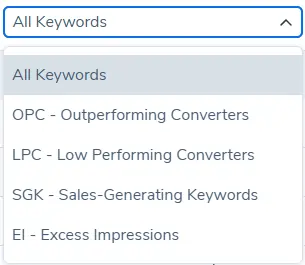
- Apply Filters: Use built-in filters such as Outperforming Converters (OPC), Low Performing Converters (LPC), Sales Generating Keywords (SGK), or Excess Impressions (EI) to fine-tune data views.
- Generate Your Report: Let the tool fetch and organise the data. This may take a few minutes for large queries.
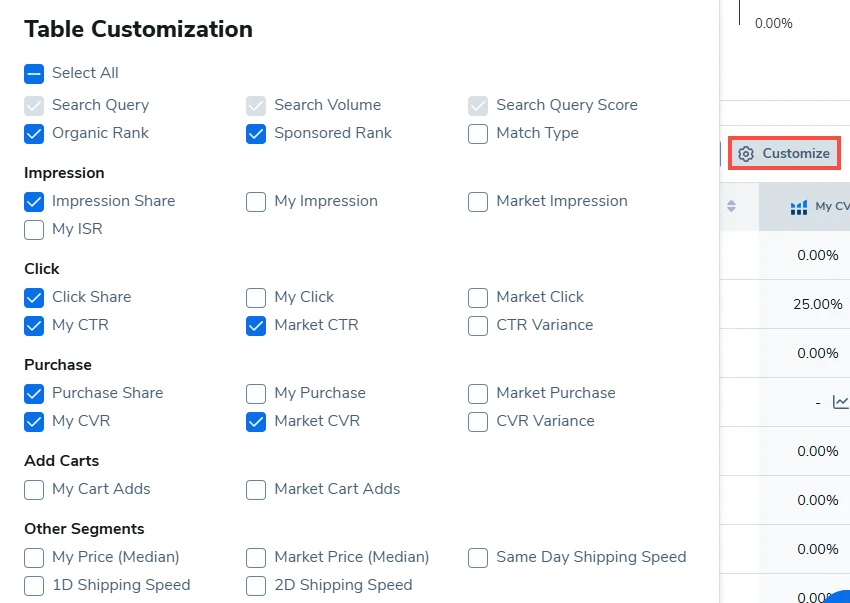
Once the report loads, you’ll see detailed columns with metrics for each keyword, including search volume, organic rank, sponsored rank, impressions, clicks, CTR, add-to-cart rate, and purchase volume.
Best Practices for Maximising Gains
To get the best results from Helium 10 Search Query Analyzer, consider these tips:
This approach turbocharges both your organic discovery and paid ad efficiency, making every marketing pound count.
How It Helps Affiliate Marketers and Media Buyers

For affiliate marketers and media buyers, knowing which keywords trigger purchases means better targeting for ads and content. Use Search Query Analyzer data to:
This tool gives you a proper advantage when negotiating with clients or pitching campaign proposals backed by real purchase data. Plus, understanding buyer intent through search query patterns helps craft messaging that actually resonates with what shoppers want to buy.
Search Query Analyzer vs Other Keyword Tools
When comparing Helium 10 Search Query Analyzer to other keyword research tools, the differences become clear in terms of data accuracy, functionality, and actionable insights.
| Feature | Helium 10 Search Query Analyzer | Basic Keyword Tools | Amazon Brand Analytics |
|---|---|---|---|
| Real-time Amazon SQP Data | Yes | No | Limited |
| Multi-ASIN Analysis | Yes | No | No |
| Full Funnel Metrics | Impressions, clicks, purchases | Usually search volume | Impression & Click rates |
| Filtering by Performance | Yes, advanced filters (OPC, LPC) | No | Limited |
| Integration with Helium 10 Suite | Yes | No | No |
| Ease of Use and Visuals | Intuitive, visual dashboard | Basic spreadsheets | Basic dashboard |
This comparison shows why serious Amazon sellers choose Search Query Analyzer for its depth of data and user-friendly interface that saves hours of manual analysis.
Wrapping It Up for 2026 and Beyond
The Helium 10 Search Query Analyzer is a game-changer for anyone serious about Amazon selling and affiliate marketing. It brings clear, actionable keyword data sourced directly from Amazon’s Search Query Performance, blending it with Helium 10’s robust features.
If you’re a solo affiliate marketer, a media buyer managing large PPC budgets, or an Amazon brand owner, this tool provides clarity and precision necessary to boost visibility, clicks, and conversions for your products.
Start your Helium 10 Diamond subscription today and make Search Query Analyzer the cornerstone of your Amazon keyword strategy for 2026 and beyond.

Stay Updated with Us
🚀 Get Exclusive Affiliate Marketing Secrets🚀
Discover the strategies, tools, and tactics used by the top 1% of affiliate earners!

Join 69,572+ Affiliates already leveling up their game
Affiliate Disclosure: This post may contain some affiliate links, which means we may receive a commission if you purchase something that we recommend at no additional cost for you (none whatsoever!)